whoami: Robert Harker
Linux Systems Administrator/DevOps Engineer.
- Early Sun Microsystems employee supporting Sun's corporate IT infrastructure
.
- 30 years experience building the Internet.
- 10+ years teaching Internet protocols and email infrastructure.
- Last 7 years managing web farms, working with DevOps teams, Yahoo, UGO.
Open Data Evangelist.
- Working as a volunteer on San Mateo County's Open Data portal
- I have a wide range of operational experience:
Web technology, Internet protocols,
Data center server operations, DevOps software development process.
Caution: I am a Linux ops guy not a PHP programmer.
Please make an accommodation to my severe allergic reaction to Power Point
Slides prepared using vi and W3C Slidy,
A presentation system/template implemented in 6 file CSS styles sheets and
one Java script.
Continuous Integration and Agile Development
Continuous Integration
Using automation to dynamically rebuild and validate code each time a change is made
Automation is key:
- Rebuild/validate[/deploy] happens automatically based on tools
Agile Development
Releasing early and often
- Continuous deployments
- Periodic releases:
- Weekly feature releases
- Daily bug fix releases
People can generally clearly remember changes in the last 2-3 weeks
What is jenkins?
Orchestration tool:
Jenkins is a comprehensive CI framework
- Browser based
- Users/security
- Projects
- Branches
- Jobs
- Drill-down build artifact exploration
- Artifact/log management
Jobs and Builds
Defines job:
- Environment
- Condition to trigger job
- Steps to complete job, build script:
- Build/validate/deploy commands
Automatically build job:
- Automatic trigger
- Build result: pass/warning/fail
- Build artifacts:
- Output from build/validate/deploy commands
Installing Jenkins
Linux:
Follow instructions on:
- https://wiki.jenkins-ci.org/display/JENKINS/Installing+Jenkins
Hints:
- Add yourself to group jenkins
- Configure to auto start
- Open firewall port
Windows:
Mac:
Left as an exercise to the user
Start Jenkins Java process
- service jenkins start; service jenkins status
- systemctl start jenkins; systemctl status jenkins
- service jenkins start; service jenkins status
- systemctl start jenkins; systemctl status jenkins
Jenkins Overview
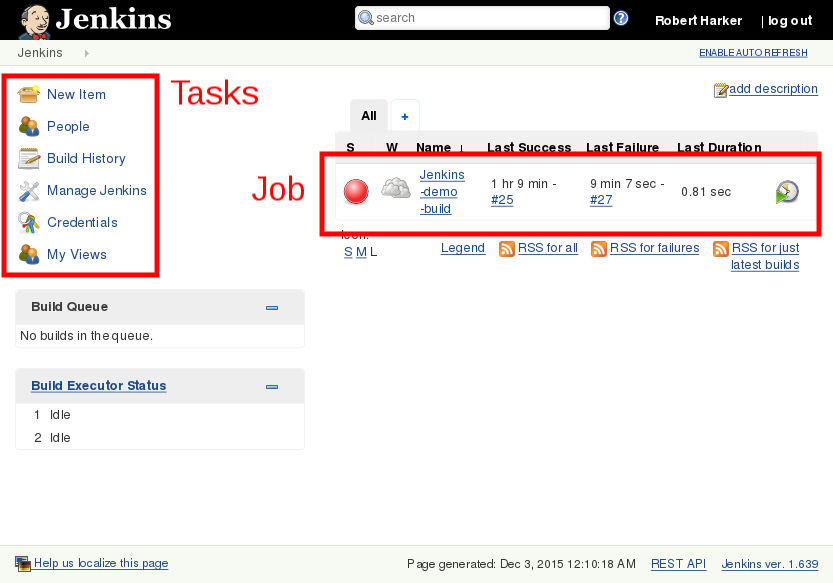
Dashboard:
- New Item
- People
- Build History
- Manage Jenkins
- Credentials
- My Views
Manage Jenkins

- Configure System
- Configure Global Security
- Reload Configuration from Disk
- Manage Plugins
- System Information
- System Log
- Load Statistics
- Jenkins CLI
- Script Console
- Manage Nodes
- Manage Credentials
- About Jenkins
- Manage Old Data
- Manage Users
- In-process Script Approval
- Prepare for Shutdown
Secure Jenkins
Caution: once you have started jenkins for the first time you are in a security window

First step is to secure jenkins
- Connect to jenkins:
- From the main dashboard:
- Manage Jenkins -> Configure Global Security
- Choose:
- Access Control -> Jenkins’ own user database
- Enable:
- Save
- Anyone can create an account and make any changes
Create your own account
In the upper right corner you should see:
Select and create your own account
Login with this new account
Disable "Allow users to sign up":
- Manage Jenkins -> Configure Global Security
Disable:
Save
You have closed security window
New users can be added with:
- Manage Jenkins -> Manage Users -> Create User (left column)
Manage Plugins
Install GitHub plugin

GitHub plugin installs:
- GitHub API Plugin
- GIT client plugin
- GIT plugin
- Plain Credentials
Notice jenkins shows status of installation
Add Credentials
Manage Credentials
SSH Username with private key
Add your jenkins private key
Add Job
- New Item
- Item name
- Freestyle project
Job configuration

- Project name: Jenkins-Demo-Build
- GitHub project: git@github.com:/rlh100/jenkins-demo.git/
- Source Code Management:
- Git
- Repository URL: git@github.com:/rlh100/jenkins-demo.git
- Credentials: jenkins
- Build
- Execute shell
- Command
./build.sh
./package.sh
Jenkins Job 2

Jenkins Job 3

Jenkins Job 4

Discussion:
Questions?
Thank You
Thank Yous:
view source
Robert Harker
<harker@harker.com>